Three practical smartphone setups with Moblin, Moblink, external RTMP cameras, SRTLA, OBS, plus audible chat and alerts.
Real-world setups
The smartphone as your mobile streaming hub
A stream phone can bring camera, audio, external RTMP sources, and several internet connections together in one mobile setup. In the examples shown here, an iPhone with Moblin processes the finished stream. Other smartphones add connections through Moblink or take over Streamer Hub, chat TTS, and alerts.
The three setups are not rigid shopping lists. They show how you can sensibly split up the devices you already have, from a simple smartphone setup to a motorcycle stream with two action cams.
Camera, external RTMP sources, video processing, bonding, and the finished stream
Watch temperature, power supply, and app stability
Second iPhone with Moblin
Provides an extra connection through the built-in Moblink feature
On iOS, Moblink doesn't need a separate app
OnePlus 13
Moblink, Streamer Hub, chat TTS, and alerts
Send audio deliberately to a headset or speaker
Another Android phone
Extra Moblink connection
Use an independent cellular plan if you can
GL.iNet Mudi 7
Shared Wi-Fi for the devices involved
The router is the connection point, but no substitute for independent uplinks
Keep in mind: The fewer side jobs the central device has, the easier it stays cool and stable. That's why chat TTS, Streamer Hub, and alerts run on a companion device in the setups shown.
Roles are interchangeable: The model names describe the devices used in practice. What matters is performance, app compatibility, cooling, power supply, and reliable network paths.
2. The three setups at a glance
In all three setups, a central iPhone with Moblin sits in the middle. What differs is where the picture comes from and which devices help out.
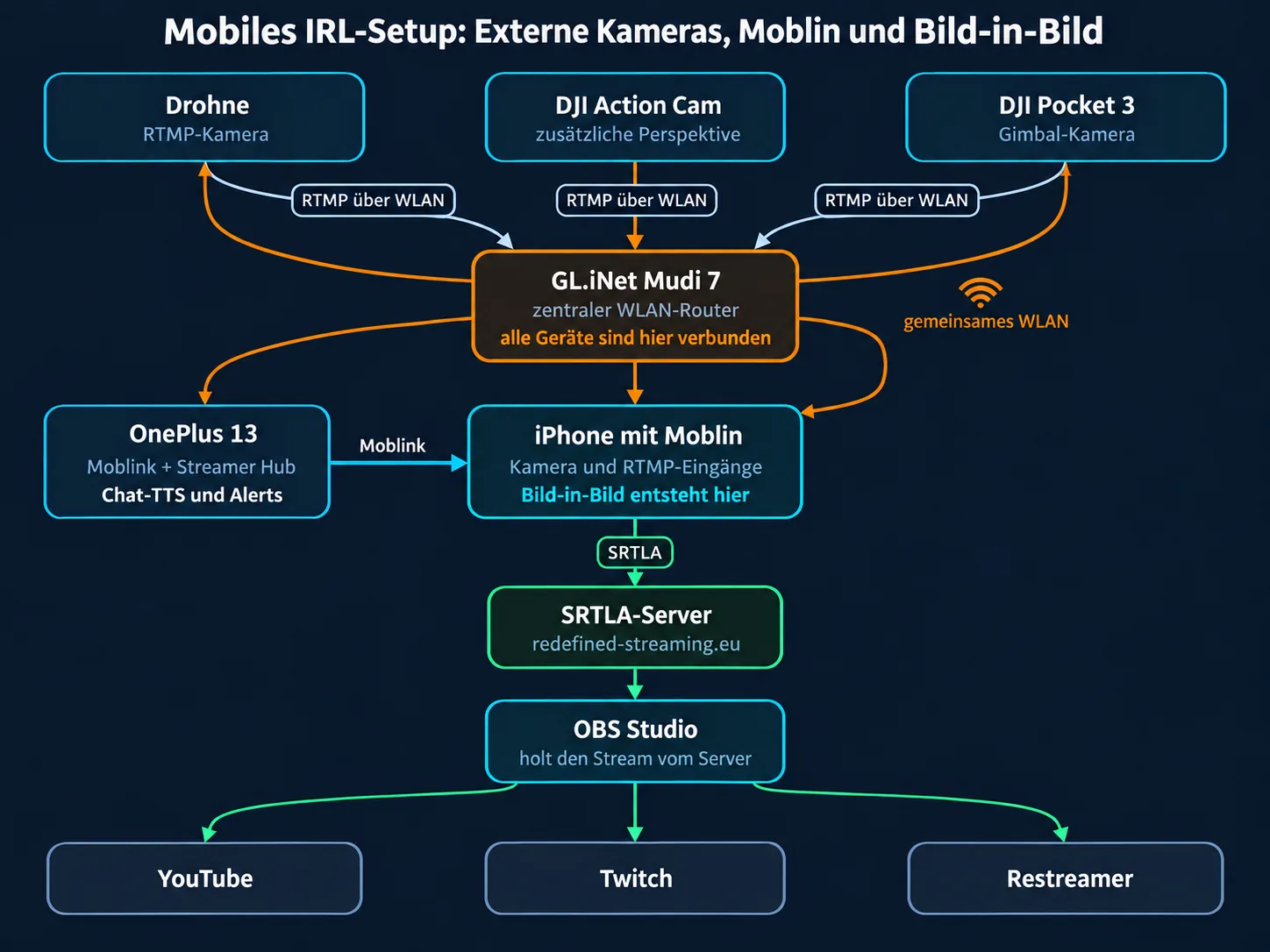
In this setup, the iPhone with Moblin takes in several external RTMP sources. A drone can supply the main picture, while a DJI Action Cam or DJI Pocket 3 serves as another perspective or picture-in-picture source. The GL.iNet Mudi 7 connects all the devices in one shared Wi-Fi network. The OnePlus 13 adds Moblink plus Streamer Hub with chat TTS and alerts.
Setup 1: external RTMP cameras, router, and companion devices around the central iPhone
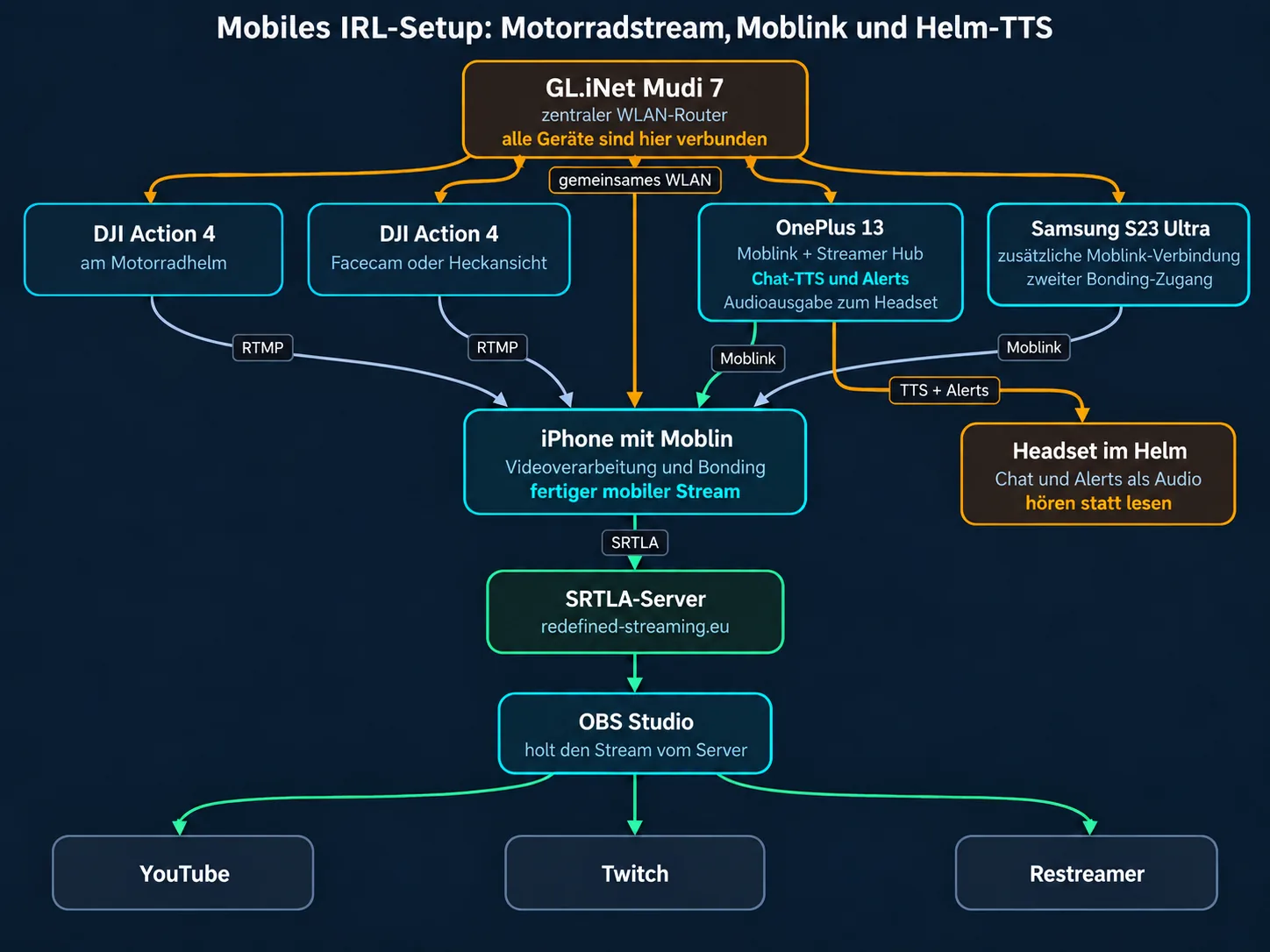
In the motorcycle setup, a DJI Action 4 on the helmet supplies the riding perspective. Depending on the mount, a second Action 4 can serve as a face cam or a rear view. Both cameras send separately to Moblin over RTMP. The GL.iNet Mudi 7 provides the shared Wi-Fi. The OnePlus 13 handles Moblink, Streamer Hub, chat TTS, and alerts, and a Samsung Galaxy S23 Ultra adds a second Moblink path.
Setup 2: motorcycle stream with two action cams and helmet TTS
Safety first: Cameras, smartphone, and cables have to sit firmly and must not get in the way of your view, steering, or freedom of movement. Only change settings when you are safely stopped. TTS can spare you from reading while riding, but it doesn't replace your full attention on traffic.
5. Pure smartphone setup with a central router
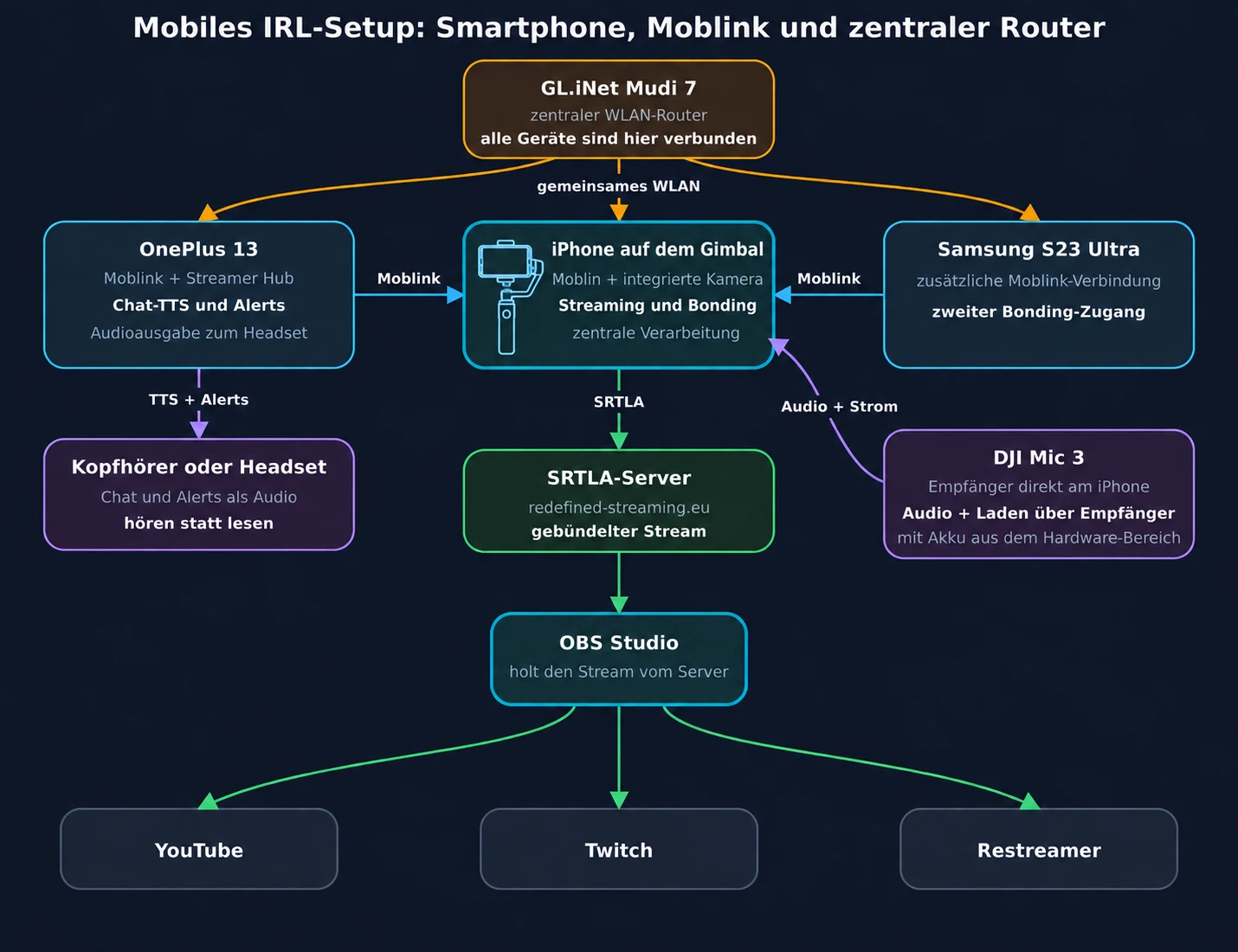
This setup needs no separate camera: the iPhone on the gimbal films and processes the stream in Moblin. The OnePlus 13 and Samsung Galaxy S23 Ultra take on extra jobs and provide Moblink connections. The GL.iNet Mudi 7 connects the devices over a shared Wi-Fi network, and the DJI Mic 3 supplies the audio.
Setup 3: pure smartphone setup with a gimbal and a central router
Moblink gives the central Moblin device extra network paths from other smartphones. That can make the mobile uplink more robust, as long as the paths are really independent of each other.
Second iPhone running Moblin as a Moblink device
On a second iPhone, the Moblink feature is already built into Moblin. That iPhone can therefore act as an extra connection provider for the central Moblin device, and you don't have to install a separate Moblink app on iOS. In Moblin, you turn on the Moblink feature on the second device and connect it to the central streaming iPhone.
Practical variant: One iPhone films and processes the stream in Moblin. A second iPhone also runs Moblin, but in this setup mainly takes the Moblink role and adds its own cellular path.
Test each connection on its own first.
Combine different cellular providers or networks where possible.
In a test stream, check what happens when a single path drops and when it comes back.
Always judge RTT together with packet loss and how stable the stream actually is.
Don't just connect extra devices. Keep them powered and cooled over the long run too.
Several plans are no guarantee of stability. If all the devices use the same congested cell or the same router uplink, that shared weak point stays.
The three videos show the setups in real use: external cameras, a motorcycle stream, and a pure smartphone stream with a gimbal at IFA Berlin. They complement the diagrams but don't replace a full test with your own devices, cellular plans, and current app versions.
Drone and DJI Action 4 as picture-in-picture
Load YouTube video only after consent
Loading it connects to YouTube and Google. Your IP address, device and browser data, and cookies or account information may be processed.
A smartphone setup only becomes practical for everyday use once every device reaches the planned runtime and can shed its heat. Camera, display, video encoding, cellular, Wi-Fi, Bluetooth, and charging all create load at the same time.
Use a power bank and USB-C charger with enough reserve.
Secure cables against pulling and don't mount connectors under tension.
Avoid direct sun, closed bags, and blocked cooling surfaces.
Check mounts mechanically before you ride or move.
Test the wireless mic, headset, and TTS output together so you don't get doubled audio.
In the Moblin setup shown here, the iPhone takes in its own camera and external RTMP sources, processes picture and audio, and sends the finished mobile stream to the server over SRTLA.
What is the second smartphone for?
A second iPhone can use the Moblink feature built into Moblin and provide an extra internet path. You don't need a separate Moblink app on iOS. Alternatively, a companion device can combine Moblink with Streamer Hub, chat TTS, and alerts.
Can I connect an action cam or drone to Moblin?
In the practical setups shown, compatible cameras and drones can send to Moblin over RTMP. Test the complete setup before you go out.
Does a second phone replace a stable server?
No. Extra smartphones provide more connections or companion functions. For SRTLA, OBS production, and controlled forwarding, you still need a suitable receiver or server.
How many smartphones do I need at minimum?
One is enough: the central device. In the simplest case, the smartphone films and processes the stream itself. Additional devices are optional. They're worth it if you need extra internet paths through Moblink. Or if you move chat TTS, alerts, and Streamer Hub to a companion device so the central one has less to do.
Trademark notice
Apple and iPhone are trademarks of Apple Inc. DJI, OnePlus, Samsung, GL.iNet, and other product names are trademarks of their respective owners. IRL4YOU is not affiliated with these companies.