
Your phone as an IRL streaming camera
Three small Android apps from IRL4YOU for IRL streaming, meaning live streams on the go: Two turn your phone into a camera for the IRL4YOU BOX, and IRL4YOU Cam Net can also send straight to servers. The third, IRL4YOU Stream Link, turns a second phone into an extra network for SRTLA. IRL4YOU Cam Net can also use DJI cameras as the video source.
Each app is about 1 MB, uses the phone's hardware encoder and needs no additional libraries. Please try them out yourself briefly before going live.
About 1 MB: an IRL streaming app that takes hardly any space
Each of the three apps is about 1 MB: IRL4YOU Cam 0.85 MB, IRL4YOU Cam Net 1.0 MB and IRL4YOU Stream Link 0.67 MB (current versions). For comparison: a single phone photo is often larger.
That works because the apps have only what you need for streaming: the picture is encoded by the phone's video encoder (usually in hardware), the graphics unit rotates it, and there are no additional libraries. Even so, IRL4YOU Cam Net sends over RTMP, RTMPS, SRT and SRTLA and bonds several networks.
1. The three apps
| App | Version | Sends to | Internet permission | Meant for |
|---|---|---|---|---|
 IRL4YOU Cam | 0.1.88 | IRL4YOU BOX via USB cable | no | the USB app, BOX only |
 IRL4YOU Cam Net | 0.1.281 | USB box plus RTMP, RTMPS, SRT, SRTLA | yes | sending to your own servers, bonding several networks or using DJI cameras as the video source |
 IRL4YOU Stream Link | 0.1.16 | passes the stream of IRL4YOU Cam Net or the IRL4YOU BOX on over its own mobile network | yes | a second phone as an extra network for SRTLA, with IRL4YOU Cam Net or the BOX, without camera or microphone |
All three can be installed side by side and have separate version numbers. They are available for Android only (8.0 or newer).
2. What IRL4YOU Cam and IRL4YOU Cam Net can do
- Send the phone's video and audio to the IRL4YOU BOX over a USB cable, without Wi-Fi
- Video as H.264 or H.265, up to 1080p at 25, 30, 50 or 60 frames per second; IRL4YOU Cam Net also offers 720p at 25, 30, 50 or 60. Bitrate up to 10 Mbit/s
- Audio as AAC in stereo or mono, mute button, volume control and level meter
- Choose rear lenses individually, front camera, pinch to zoom with automatic lens switching, portrait and landscape
- Display of battery, charging state, current and temperature, also visible on the box
- Keeps running when the screen turns off, and survives a restart of the box or briefly unplugging the cable
Additionally in IRL4YOU Cam Net
- Send over RTMP, RTMPS, SRT or SRTLA to a server; if the connection drops, the app reconnects by itself
- Several saved connections with a name and a short summary; while sending, the connections page stays locked so nothing private is on screen
- SRTLA bonds Wi-Fi, mobile data and a USB network (Ethernet adapter, USB router or USB tethering) into one stream; if a network drops, it continues over the others
- With SRT and SRTLA the app adapts the video bitrate itself, never above the chosen bitrate
- DJI and other RTMP cameras as the video source, up to three at once (see section 3)
- External microphone (USB, cable, Bluetooth) selectable
- Share connections to another phone by QR code or link and back up settings encrypted
3. DJI cameras and other RTMP cameras (IRL4YOU Cam Net only)
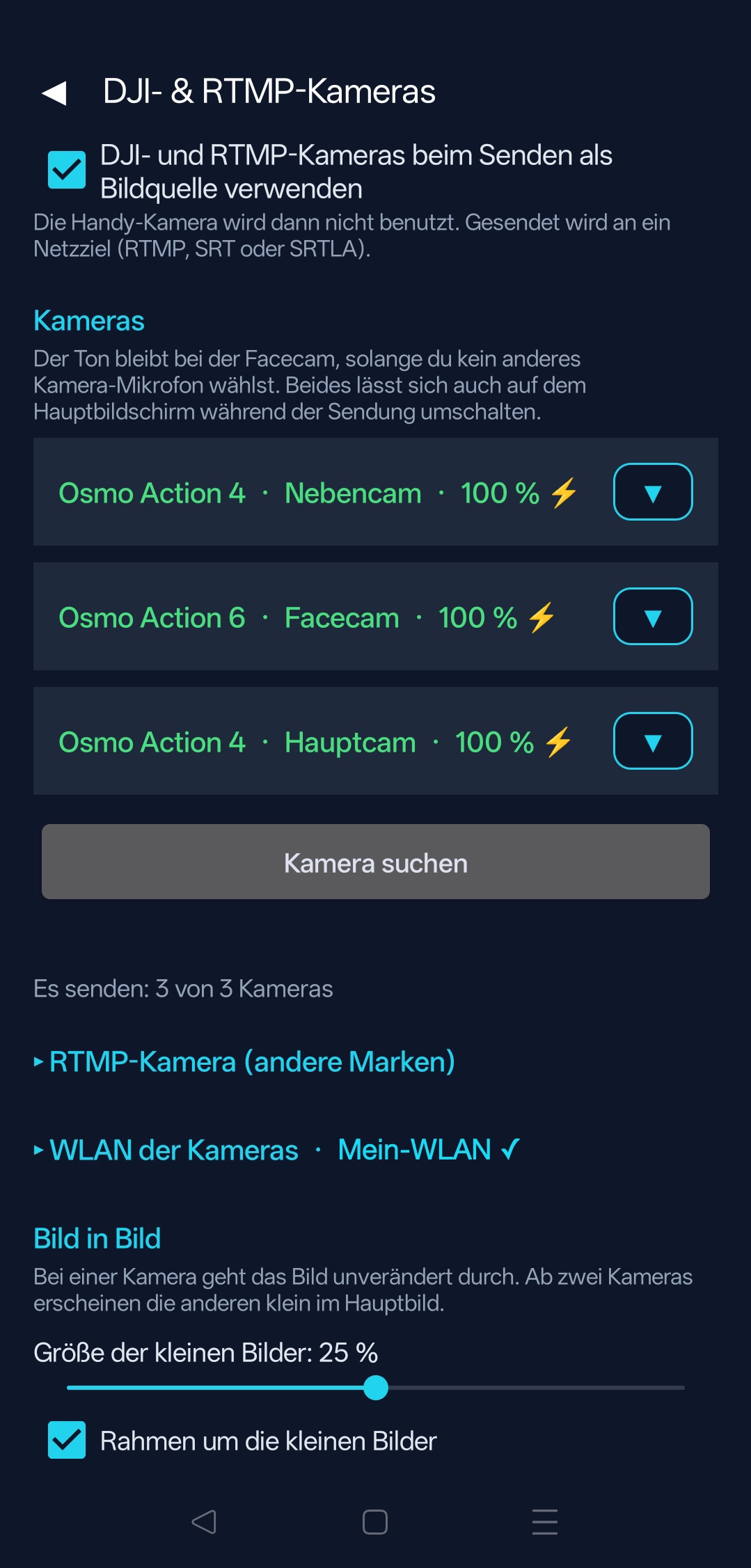
DJI cameras replace the phone camera as the video source. The app pairs the camera over Bluetooth, enters the Wi-Fi, starts the stream and receives it on the phone over RTMP. Tested are the Osmo Action 4 and Osmo Action 6. The Osmo Action 5 Pro, Osmo Pocket 3, Osmo Pocket 4 and Osmo Pocket 4 Pro are built in and should work, but have unfortunately not been tested yet.
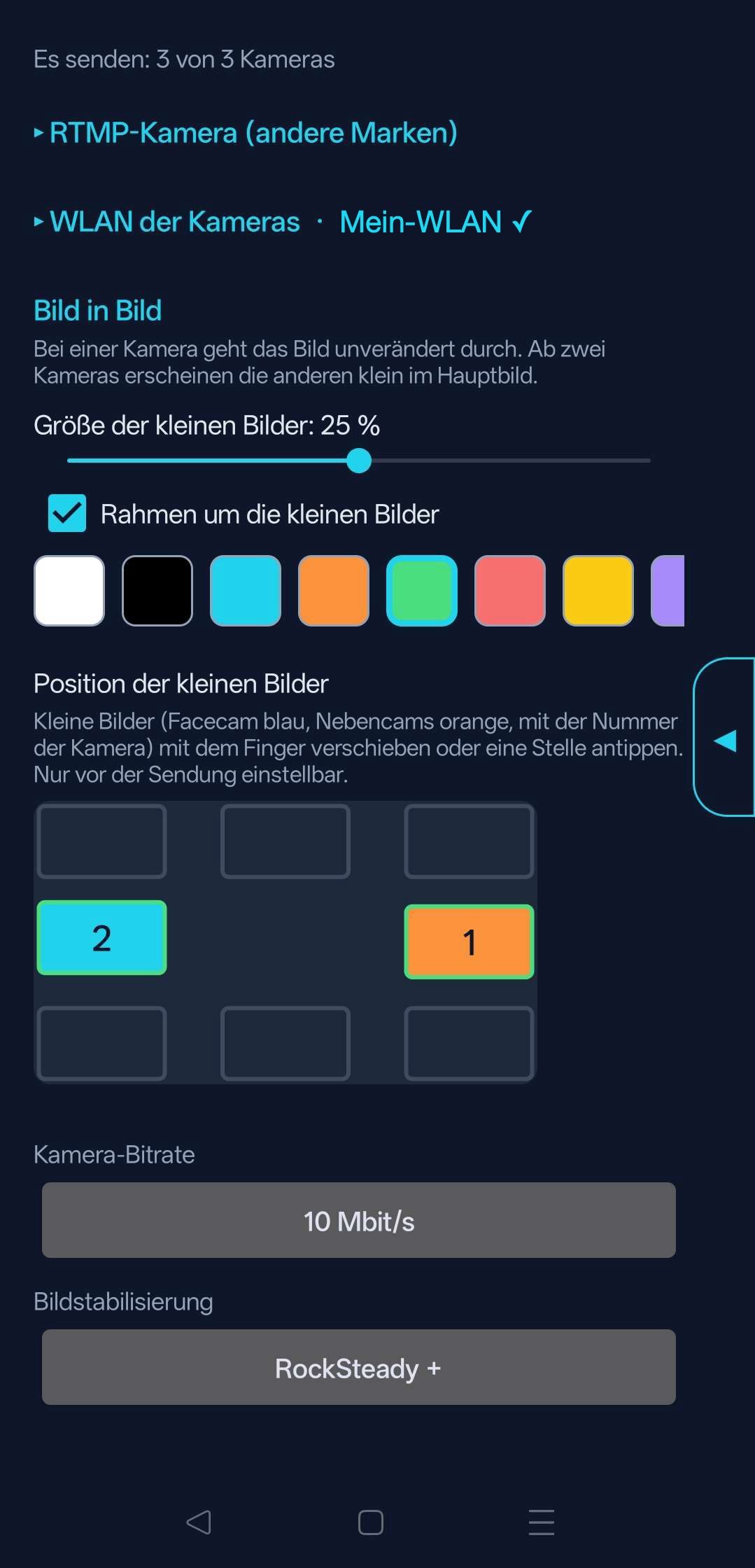
- Several cameras: up to three at once. One is the main picture, the others appear small in the frame (picture in picture). The face cam and the side cams can be placed freely, with a frame in one of eight colors if you like.
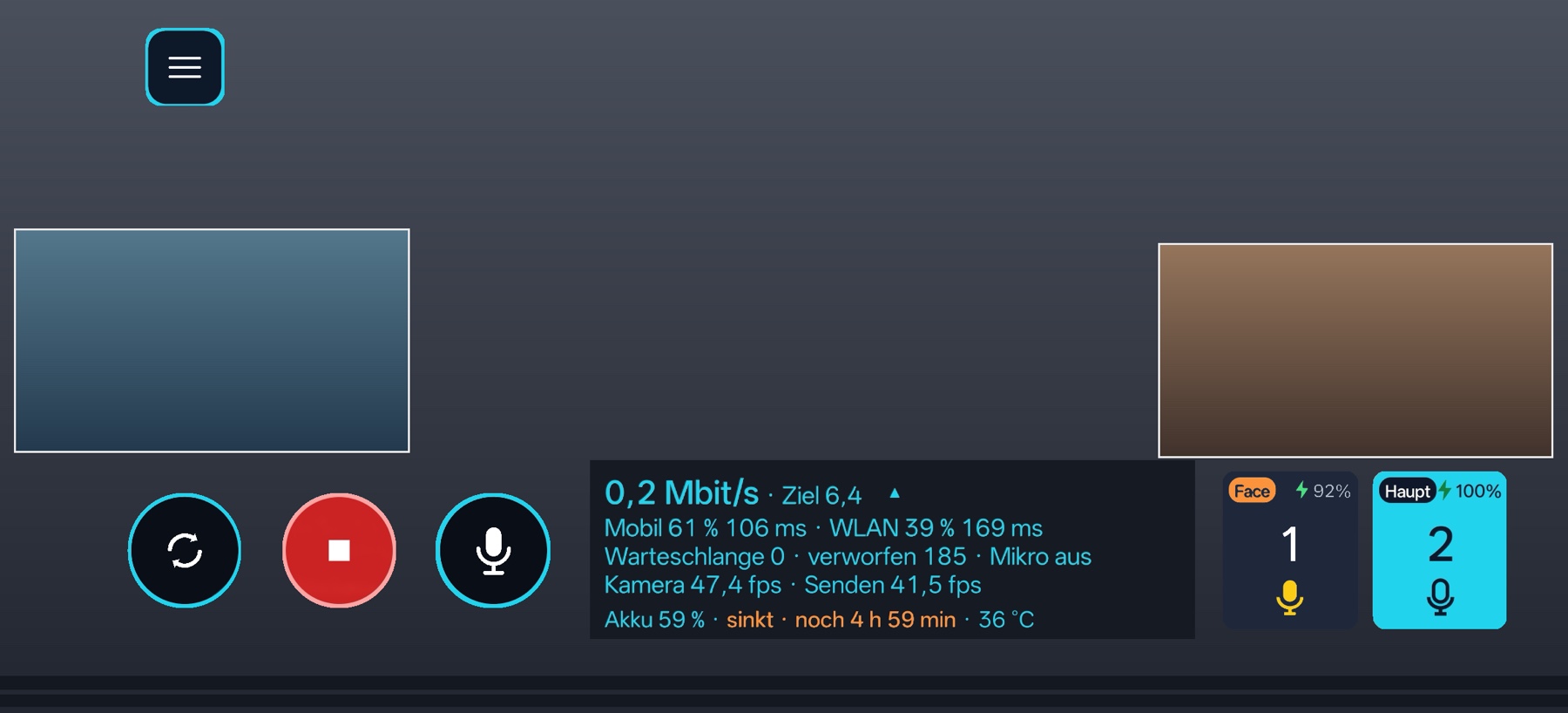
- Switching: On the main screen each camera has an icon showing battery level and charging state. Tapping it makes it the main picture; the microphone in the icon sets which camera the sound comes from (default: face cam). This also works during the stream.
- Other brands: Cameras that send RTMP are added by name; the app shows the server and stream key, and you enter them in the camera.
- On to the server: as usual over RTMP, SRT or SRTLA, with all networks and the data rate control.
- Staying connected: A service with a notification keeps the connection to the cameras, even with the screen off. After the app restarts (for example after an update), the cameras reconnect by themselves.
How it works in the app
- Open the "DJI- & RTMP-Kameras" menu (DJI & RTMP cameras) and tick the box.
- Choose "WLAN der Kameras" (the cameras' Wi-Fi) and save it.
- Tap "Kamera suchen" (search for camera), tap the camera, then "Verbinden" (connect).
- Set main cam, face cam, sound, position and frame.
- Under "Verbindungen" (connections) choose the destination and send.
IRL4YOU Cam is not a DJI product and is not affiliated with DJI. The Bluetooth control follows publicly documented open-source projects (MIT license); notices and license texts are in NOTICE.md in the repository and in the app under "Hinweise zu Drittprojekten" (notices on third-party projects).
4. IRL4YOU Stream Link: a second phone extends your network
The app runs on a second Android phone (Android 8.0 or newer) and passes the stream of IRL4YOU Cam Net or of the IRL4YOU BOX on over its own mobile network. For SRTLA this is one more network next to the existing ones: more bandwidth and a second path when one gets weak.
- The sender (phone with IRL4YOU Cam Net, or the BOX) and the helper phone are in the same network (router or hotspot).
- Install IRL4YOU Stream Link on the helper phone, switch on mobile data, set a password and tap "Start".
- In IRL4YOU Cam Net choose SRTLA, tick "Stream Link" and enter the same password. On the BOX, switch on "Stream Link" under "Network" in the interface and enter the password. The BOX needs the current software for this.
- Start the live stream: the helper phone shows up as an extra link.
The app needs neither camera nor microphone. The password is never transmitted, and nothing is stored or sent to third parties. Change the preset password when you use a Wi-Fi that is not your own. It also works with an iPhone hotspot; whether it works depends on the hotspot.
5. Installation and use
- On the phone, open the releases on GitHub and download the APK you want (
IRL4YOU-Cam.apk,IRL4YOU-Cam-Net.apkorIRL4YOU-Stream-Link.apk). For DJI and other RTMP cameras, takeIRL4YOU-Cam-Net.apk, not the USB app. - Open the file, allow installs from this source once and tap "Install".
- Start the app and allow the permissions for camera, microphone and notifications. For DJI cameras, Bluetooth (nearby devices) and location are added; location is used only to read and search Wi-Fi names. Android needs the notification so the app may keep sending in the background.
- Updates: install the new APK over the old one, settings are kept.
With the BOX: Connect the phone to the BOX with a data cable, allow USB access, choose lens, codec, frame rate and bitrate, and start. The BOX shows the phone as a camera. More about the BOX is on the IRL4YOU BOX page.
A USB port often charges the phone more slowly than the camera uses power. A USB hub with its own power supply works better. If the phone gets too warm, switch off the preview first, then choose 30 instead of 60 frames per second.
6. Limits and status
We test on real devices, but not every line is reviewed by hand. Please try them out yourself before going live.
- No recording on the phone, no filters, no effects, no overlays (except the small camera pictures when using several cameras).
- Over USB only with the IRL4YOU BOX (BOX version 0.5.142 or later).
- H.265 over RTMP only with servers that support Enhanced RTMP; choose H.264 to be safe.
- Focus and exposure are automatic, setting them by hand is not possible yet.
- Rotating the phone between portrait and landscape during a stream over the network changes the picture size, and some servers cannot handle that.
- With a VPN that redirects all traffic, IRL4YOU Cam Net reports "Server antwortet nicht" (server does not answer). Exclude the app from the VPN in the VPN app, or turn the VPN off while sending.
- The iPhone hotspot route was tested with a Samsung as the helper phone and a OnePlus as the sending phone; other devices are untested.
- The USB version IRL4YOU Cam has not been tested on a box in its current version.
- DJI cameras: only the Osmo Action 4 and Osmo Action 6 have been tested. The Osmo Action 5 Pro, Osmo Pocket 3, Osmo Pocket 4 and Osmo Pocket 4 Pro are built in and should work, but have unfortunately not been tested yet. The cameras deliver only H.264 and at most 30 frames per second, at most three cameras are possible, and the phone and cameras must be on the same Wi-Fi (for example the phone's hotspot or a router). Receiving, combining and re-encoding three cameras costs processing power and battery: a power supply or power bank helps, and when it gets warm, switch off the preview.
Reporting bugs
Please report bugs on GitHub or in the IRL4YOU Discord. In the app, the Logs button copies events and camera info for your report.
Privacy and license
The apps have no ads, no analytics or crash reporting services and no account, and no data goes to IRL4YOU. IRL4YOU Cam Net sends only to the destination you enter yourself. The source code is not public. Using the apps is allowed, privately and commercially; copying and redistributing them is not. The texts are in the repository under license and privacy.
7. FAQ
Do I need the IRL4YOU BOX for the apps?
IRL4YOU Cam does, because it only sends over USB to the box. IRL4YOU Cam Net can also send straight to a server (RTMP, RTMPS, SRT, SRTLA), so it works without a box too.
Which app should I pick?
If you only want to feed the BOX, IRL4YOU Cam is enough. If you want to send to your own servers or bond several networks, take IRL4YOU Cam Net. IRL4YOU Stream Link goes on a second phone and adds to IRL4YOU Cam Net or the BOX.
Which cameras work besides the phone?
IRL4YOU Cam Net can use DJI cameras as the video source. Tested are only the Osmo Action 4 and Osmo Action 6. The Osmo Action 5 Pro, Osmo Pocket 3, Osmo Pocket 4 and Osmo Pocket 4 Pro are built in and should work, but have unfortunately not been tested yet. Other cameras that send RTMP can be added too. More in section 3.
Can I install all three at once?
Yes. Each app has its own app ID and its own version numbers.
Are the apps available for iPhone?
No, Android only. IRL4YOU Stream Link does work with an iPhone hotspot as the Wi-Fi.
May I pass the apps on?
Using them is allowed, privately and commercially. Copying, redistributing or re-publishing them without written permission is not. You may share the link to the releases page.